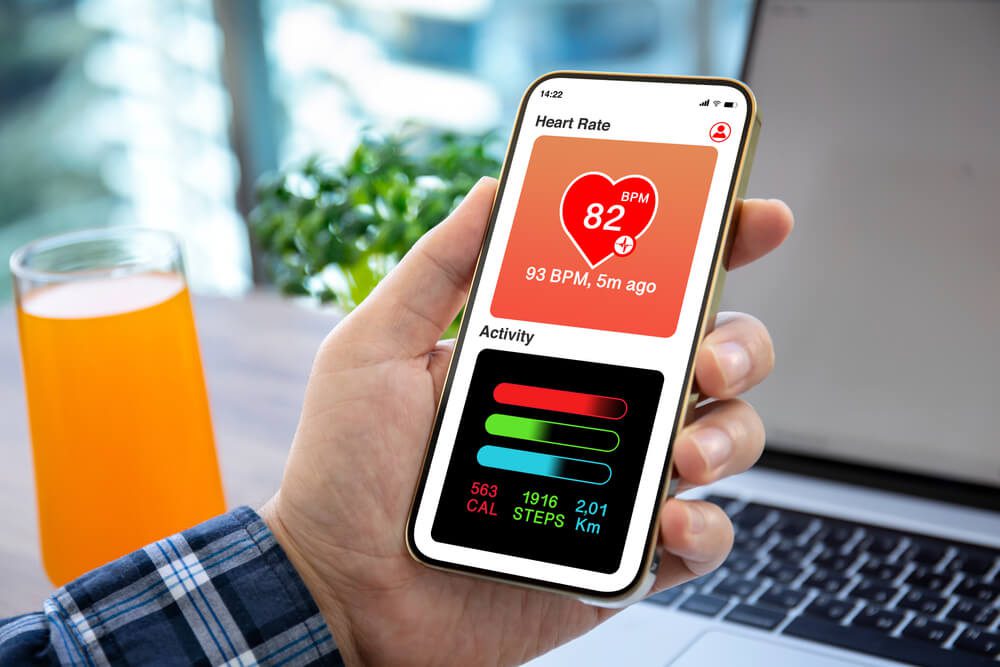
The Best Health Apps to Track Fitness, Nutrition, and Wellness

The best health apps turn your phone into a daily tool for tracking habits, managing health conditions, and building routines that actually stick. Growth in healthcare app development has produced hundreds of thousands of options across the Play Store and App Store, backed by just as much investment in digital marketing for healthcare.
The apps below have earned their spot through real usefulness, strong track records, and features people return to. Start with the category that matches your goal, and use the privacy checklist near the end to evaluate any app you’re considering beyond this guide.
How We Chose the Best Health Apps
A strong health app does three things well: it makes tracking repeatable, it handles your data transparently, and it returns something useful beyond raw numbers. We weighed those qualities first, then looked at active development, reputation among users with long track records, and whether the free version delivers genuine value before a paid upgrade.
One caution before you download. An app supports your health choices, it doesn’t replace a clinician. For criteria on spotting a reliable app, Healthline’s guide to trustworthy health apps is a useful reference.
Best Health Apps for Nutrition and Weight Management
If your goal involves your diet, these apps cover the range from precise calorie counting to relaxed meal planning. Each one logs what you eat and gives you a clear picture of whether your choices are moving you toward your goals.
Fooducate, a Nutrition App
Fooducate focuses on the health benefits, macronutrients, and calorie counts for a wide variety of foods. The database covers over 300,000 barcoded products, from pantry staples to brand-name packaged goods. You can look up how much protein is in your favorite yogurt, or decide which ingredients to add to dinner while staying under your calorie target.
What sets Fooducate apart is the letter grade it assigns to packaged foods, A through D, which turns a complex nutrition label into a judgment you can make in the aisle. The coaching layer makes it especially useful if you’re still building your nutritional literacy rather than just counting numbers, and a free tier means you can try it before paying for the premium features.
MyFitnessPal, a Food Tracker App
MyFitnessPal is one of the most popular meal planners and nutrition trackers on the market, and it has held that spot for years. It includes a comprehensive database of foods, so you can track calories and nutrients in basic ingredients, brand-name items, and entire recipes. It connects with fitness platforms, wearables, and supports barcode scanning, so logging happens as passively as possible. These features are exactly what makes it stick for people who resist manual entry.
The commercial scale behind the app is real. MyFitnessPal ranked second in overall consumer health-app revenue in 2025, trailing only WeightWatchers, according to Business of Apps’ health app analysis. That revenue goes directly into database expansion, new integrations, and the regular updates that keep a daily-use app from going stale.
Lifesum, a Diet and Exercise App
Rather than a strict calorie counter, Lifesum takes a more relaxed planning approach. You enter your details and get recommendations for meals, calorie counts, and exercises to try. You can track your efforts over time and share them with an online community. Lifesum also leans on simple visual feedback rather than dense spreadsheets, which suits people who find strict tracking rigid and want encouragement instead. A subscription unlocks the full meal plan library, but the free tier gives you enough structure to test whether the approach fits.
Apps for Fitness and Movement
You don’t need an expensive gym membership to move more. These fitness apps bring structured workouts and flexibility training to wherever you already are.
Home Workout, an Exercise App
This easy-to-use app guides you through fitness programs that teach you how to stay in shape at home. You can choose stretching and warm-ups, bodyweight or hand-weight strength training, and cardio options. The aim is to make exercise part of your day so excuses get harder to find.
Yoga Daily Fitness, a Beginner Yoga App
Yoga Daily Fitness is built for people who want structure without complexity. The guided sessions walk you through poses with clear instructions, making it a practical entry point for anyone adding movement or flexibility work to their routine. Experienced practitioners will outgrow it, but for building a consistent stretching habit from scratch, it removes the friction that usually stops beginners.
Best Health Apps for Chronic Condition Management
Managing a chronic condition involves daily decisions that add up: logging readings, tracking doses, staying consistent with a plan. The two apps in this section address that friction directly, making it easier to stay on top of monitoring and medication without rebuilding the habit every morning.
mySugr, a Diabetes App
Millions of people with diabetes track blood sugar, carbs, insulin, and activity data every single day, and that volume of manual entry is exhausting unless the tool makes it fast. mySugr keeps your glucose logs, carb records, and medication notes in one place, and connects directly with Accu-Chek meters to pull readings in automatically. For anyone whose daily health depends on consistent data, that automation makes a measurable difference.
My Therapy, a Medication Reminder App
Timing and dosage matter when you take prescription medication regularly, and missing either can undermine a treatment plan. MyTherapy lets you set scheduled reminders for each medication, record whether you took it, and log symptoms or measurements alongside your doses. The health diary it builds over time is useful to bring to appointments: your doctor gets a clear picture of what actually happened between visits, not just your best recollection.
Apps for Mental Health and Sleep
Caring for your mind is as important as caring for your body, and one app stands out for making a healthier mindset accessible in a few taps.
Headspace, a Meditation App
Headspace is one of the most widely used meditation apps available, and its structured approach makes it particularly useful for people who have never built a consistent mindfulness practice. It offers guided meditations, sleep content, and short emergency sessions for anxious moments. Its popularity has grown steadily as more people treat mental fitness as seriously as physical fitness, and having structured sessions available at any moment lowers the barrier to keeping the habit going.
Apps for All-in-One Tracking
Some people prefer one hub that pulls steps, heart rate, sleep, and workouts together instead of juggling several single-purpose tools. These platform apps are either pre-installed on specific devices or available as free downloads, and they connect with a wide range of wearables.
Google Health, a Health-Tracking Platform
Google Health, the rebranded home for Fitbit and Google’s first-party health data, tracks steps, heart rate, sleep, activity, and workouts in one place. It syncs with Fitbit devices, Pixel Watch, and a range of third-party wearables. A free tier covers core tracking, and paid Google Health Premium adds AI coaching and deeper trend analysis. For users who want a single Google-backed platform to anchor their health data, it is the most integrated option in that ecosystem, particularly for those with Pixel Watch or Fitbit hardware.
Samsung Health, a Heath-Tracking App
Samsung Health offers broad tracking for steps, food, sleep, heart rate, and stress, with deeper features on Galaxy phones and watches. It works on most Android devices and bundles guided programs and challenges that help you stay motivated. If you own Samsung hardware, the tight integration makes it one of the best health apps to anchor your routine.
Apps for Better Sleep
Two apps stand out for sleep specifically: one for guided wind-down and one for tracking the quality of your rest.
Calm, a Meditation and Sleep App
Calm pairs guided meditation with sleep stories, breathing exercises, and soundscapes designed to help you wind down. Many people who find one meditation style flat respond better to Calm’s pacing and narration. A free tier covers the basics, and the paid plan opens the full library of sessions and sleep content.
Sleep Cycle, a Sleep Tracker
Sleep Cycle listens for movement and sound to estimate your sleep stages, then wakes you during a lighter phase so mornings feel less abrupt. Over time, the trends show how habits like late caffeine or screen time affect your rest. It’s a focused tool that does one job well, which is exactly what some routines need.
When Healthcare Providers Build Their Own Apps
The apps covered in this guide are a specific subset of a much broader ecosystem. For a full picture of how fitness tools, telemedicine platforms, and remote monitoring solutions fit together, 10 popular types of healthcare apps cover the complete field. Consumer health-app revenue reached $3.5 billion in 2025, up 23.5 percent year over year, reflecting a market that rewards apps designed around real daily use.
As demand grows, more physicians, clinics, and wellness centers release their own apps. You’ll find options that help you stay active, manage appointments, and follow a treatment plan. Not every provider offers one, so it’s worth asking your clinic or checking its website. In many cases you can even book a telehealth visit through an app instead of driving in.
More providers entering the space means more apps built around real clinical workflows rather than passing consumer trends, which raises the overall quality of what reaches your phone. The combination of sustained investment and genuine healthcare use cases means the category will keep improving.
How to Get the Most From Your Health App
Downloading an app is the easy part. The habit is what changes your health, and a few small choices early on decide whether an app sticks or sits unused after a week.
Start with one app and one goal. Tracking everything at once usually leads to tracking nothing, so pick the single metric that matters most right now, whether that’s calories, steps, sleep, or medication timing.
When your app pulls steps and heart rate from your phone or watch automatically, you remove the manual logging that most people eventually stop doing. Set one or two daily reminders as well, since a gentle nudge at the same time each day builds the routine faster than willpower alone.
Review your trends once a week instead of worrying over single days. A single high number or a missed workout tells you little on its own, but a week or a month reveals the direction you’re actually heading. Progress in health shows up as a gradual slope, and the best health apps visualize that slope clearly so you can course-correct before a small slip becomes a pattern.
What to Look for in a Trustworthy Health App
The best health apps are easier to choose when you run each candidate through a few quick questions. Healthline’s trustworthy health app checklist covers the same territory in more depth if you want a fuller framework; the quick version is below. Before downloading, ask yourself:
- Who built it: Favor established developers with a verifiable track record. Anonymous publishers rarely offer the accountability that matters when your health data is involved.
- Is it still maintained: Check the last update date in the app store. Regular updates signal active support and current security patches, an app that hasn’t been touched in over a year is a risk.
- What does the privacy policy say: Look for plain language on what the app collects, where it stores your data, and whether it sells or shares it. If the policy is missing or unreadable, move on.
- Does the free version stand on its own: A genuinely useful free tier shows the developer is confident in the product. It also lets you build the habit before you pay.
- Does it connect to what you already use: A direct connection to your phone’s health platform or wearable eliminates manual logging, one of the most common reasons people stop using an app within a week.
Ultimately, an app earns a place on your phone the same way any service earns a customer: through consistent value and honest handling of your information. The quick version is below.
Health Apps and Your Data Privacy
Health data is sensitive, and not every app treats it that way. Most consumer wellness apps fall outside HIPAA’s protections, which means the safeguards that apply in a clinical setting do not automatically apply when you log a meal or a symptom in a third-party app.
Before sharing personal data, check how the app handles storage, third-party sharing, and account deletion. Apps from established developers tend to publish clearer policies and offer real deletion controls. A policy that is vague, missing, or buried in legal language is a signal to choose a different tool.
It also helps to limit permissions. A nutrition tracker rarely needs access to your location or contacts, so deny anything that doesn’t match what the app actually does. You can review and revoke permissions in your phone’s settings at any time. Privacy protection is part of staying healthy, and the best apps make that straightforward.
Healthcare Apps Frequently Asked Questions
The questions below address the most common concerns people bring to health app decisions, from accuracy to privacy to platform compatibility.
What are the best health apps right now?
The best health apps depend on your goal, but a few consistently rank near the top. MyFitnessPal and Fooducate lead for nutrition, Headspace leads for mental health, and mySugr is a strong pick for diabetes management. Start with the category that matches your need, then choose the app whose free version already feels useful to you.
Are health apps accurate?
Accuracy varies by app and by what it measures. Step counts and logged meals are reliable when you enter data consistently, while estimates like calorie burn are approximations. Treat the numbers as helpful trends rather than clinical readings, and confirm anything health-critical with your provider.
Are the best health apps free?
Many of the best health apps offer a free tier that covers core tracking, with paid plans that add coaching, advanced analytics, and ad-free use. MyFitnessPal, Home Workout, and Headspace all have functional free versions, so you can test the habit before you pay for extras.
Do all health apps work on both Android and iPhone?
Most leading apps, including the ones in this guide, ship on both Android and iOS. A few features differ by platform because of how each system handles sensors and notifications, so check the app store listing for device-specific notes before you commit.
How do I know if a health app is safe to use?
Check who built the app, read its privacy policy, and look for clear statements about how your data is stored and shared. Apps from established developers with regular updates and transparent permissions are safer bets than abandoned ones. The checklist in the “What to Look for in a Trustworthy Health App” section above gives you quick questions to run through.
Can health apps replace a doctor?
No. Health apps support your daily choices and help you share better information with your care team, but they don’t diagnose or treat conditions. Use them to track and stay consistent, and bring the data to your clinician for decisions that affect treatment.
Do all these apps sync with smartwatches and fitness trackers?
Many do. MyFitnessPal and Home Workout connect with popular wearables and platforms so your steps, workouts, and meals stay in one place. Syncing reduces manual entry, which is one of the biggest reasons people stick with an app long term.
Track, Trust, and Repeat Healthy Habits
The best health apps share a simple trait: they make a healthy choice easier to repeat. Pick one that matches your goal, confirm it handles your data responsibly, and let it carry the daily tracking so you can focus on the habit itself. Remember these fundamentals:
- Match the app to the goal: A calorie tracker, a meditation guide, and a glucose log solve very different problems. Pick the one that addresses what you want to change right now.
- Start with the free tier: The habit matters more than premium features you haven’t decided you need yet. Build the routine first, then upgrade if the paid plan earns it.
- Check privacy before you share data: Read who built the app, what it collects, and whether it sells or shares anything. A clear policy is the baseline.
- Treat numbers as trends: A single bad day tells you little. A week or a month reveals the direction you’re heading, and the best apps make that slope visible so you can adjust early.
If you build or market health apps and want more people to find the best health apps you create, schedule a free consultation with our team. We help healthcare brands turn strong products into the ones patients discover, download, and trust.
Want To Meet Our Expert Team?
Book a meeting directly here

Related Articles

Demand for therapy is at an all-time high, yet nearly half of the 62 million U.S. adults with a mental illness receiv...

A healthcare chatbot gives your patients an always-open front door. It answers a question at midnight, books an appoi...
The latest US digital ad spending forecast projects the market will grow from $317 to $490 billion between 2024 and 2...