
Healthcare Chatbots: Benefits, Use Cases, and How to Add One to Your Medical Website

A healthcare chatbot gives your patients an always-open front door. It answers a question at midnight, books an appointment while your phones are busy, and points someone toward the right level of care before they call. Your front desk handles the day, and healthcare chatbots cover every hour in between.
Healthcare chatbots are now a core part of artificial intelligence in healthcare and modern healthcare app development services, and the technology has matured enough to earn patient and provider trust. At Digital Authority Partners (DAP), we help practices put that technology to work. This guide covers the benefits patients value, the top use cases, the AI behind the tools, and how to add a chatbot your patients will use.
Why Patients Like Healthcare Chatbots
Patients increasingly turn to these tools first. Close to half of consumers now use generative AI for health questions, and studies measuring large language model chatbot accuracy show the technology is maturing. More providers are adding chatbots to improve communication, access, and everyday convenience, and patients respond well. Our healthcare marketing services for practices build on that momentum. A few reasons stand out.
Immediate, Around-The-Clock Access
Chatbots answer at any hour. You can help patients with common questions such as clinic hours, services, and directions without making them wait for the office to open. That immediacy turns a moment of curiosity into action, so patients act on their health the moment the thought occurs, day or night.
Privacy for Sensitive Questions
Some patients hesitate to raise personal health concerns with another person. A chatbot lets them ask sensitive questions and seek guidance while staying anonymous. That comfort builds trust and strengthens the patient-provider relationship. It often moves someone closer to booking care.
Shorter Waits and a Smoother Journey
Medical chatbots reply instantly and handle many conversations at once. You give patients back the time they used to spend on hold, and the experience stays continuous. When a patient keeps momentum, the chatbot answers the next question and guides them to scheduling, forms, or a follow-up.
Support in the Patient’s Language
Many chatbots respond in multiple languages and render screen-reader friendly text. You widen language access in healthcare for patients who speak a language other than English or who rely on assistive technology. Meeting people where they are shows respect, removes a barrier to care, and also reflects well on your practice.
How Healthcare Chatbots Help Your Practice
Patient comfort is only half the story. Healthcare chatbots carry real operational weight, and these are the use cases that consistently deliver value on a medical website built to convert.
Appointment Scheduling and Reminders
Chatbots let patients book, reschedule, or cancel appointments on their own, directly through your website and without a phone call. Automatic reminders reduce no-shows, and post-appointment follow-ups deliver care instructions. Your scheduling workload drops while the calendar stays fuller.
Picture a patient who wakes up with a cough and opens your site at midnight. The chatbot offers the next open slot, books it, and sends a reminder the day before. The patient gets on the calendar, and your team starts the day with the booking already done.
Symptom Checking and Triage
A chatbot can ask a short series of questions to gauge how urgent a situation is. It then directs the patient to the right level of care. It flags serious symptoms such as chest pain or difficulty breathing for immediate attention. Routine concerns get routed to standard scheduling.
Accuracy varies by tool, so triage works best under clinical oversight. One study measuring symptom checker diagnostic performance tested six symptom checkers against 400 physician-reviewed vignettes and found wide differences in accuracy across tools. Handled well, triage eases pressure on staff and helps patients reach the right care faster.
Administrative Automation
Routine administrative work adds up, and a chatbot can absorb a large share of it. Easing that administrative burden on clinicians frees your team for patient care. Common jobs include:
- Collecting and verifying patient information for registration
- Processing medication refill requests
- Checking insurance coverage and eligibility
- Answering questions about bills, payments, and claims
- Helping patients update medical history or personal details
- Facilitating referrals to specialists and other providers
- Answering frequently asked questions about services and policies
With repetitive questions handled automatically, your staff spend more time on patient care. The practice runs more smoothly, and patients feel the difference.
Medical Assistance on the Spot
Chatbots connect patients to resources and guidance in the moment. That might mean a relevant article, a medication reminder, or a short guided check-in that draws on a medical knowledge base to suggest a next step. Some chatbots connect to wearable devices and use that data to sharpen their guidance over time. Used well, a chatbot acts as a first-line assistant that extends care between visits.
Cost-Effective Patient Support
A chatbot manages many inquiries at once, so you answer more questions without expanding the support team. It delivers reliable information about hours, services, and treatments. It frees staff to handle escalated concerns. You can also route interested patients toward a healthcare lead generation strategy that fits your goals.
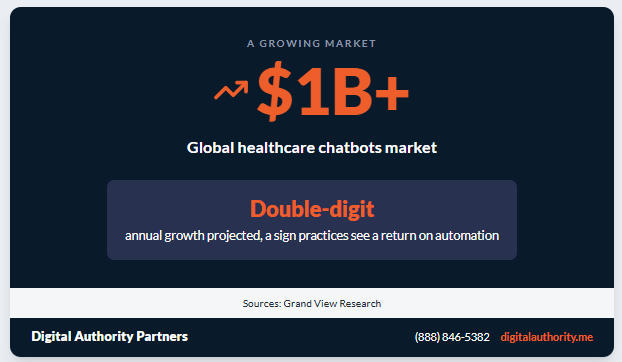
Demand reflects the payoff. The healthcare chatbots market growth has pushed the global market above $1 billion, with sustained double-digit annual growth projected, a sign that practices see a return on the automation.
Patient Education Between Visits
A chatbot can share prep instructions before a procedure and recovery steps after one. It answers the small questions that would otherwise wait for the next visit. Patients feel supported, and clinical staff field fewer repeat calls. Education that arrives at the right moment improves follow-through on care.
The AI Behind Today’s Healthcare Chatbots
The chatbot you choose behaves differently depending on the technology under the hood. Knowing the difference helps you set patient expectations and pick the right tool for your practice. You can also read more about how AI improves patient care as you plan.
How Rule-Based and AI-Driven Tools Compare
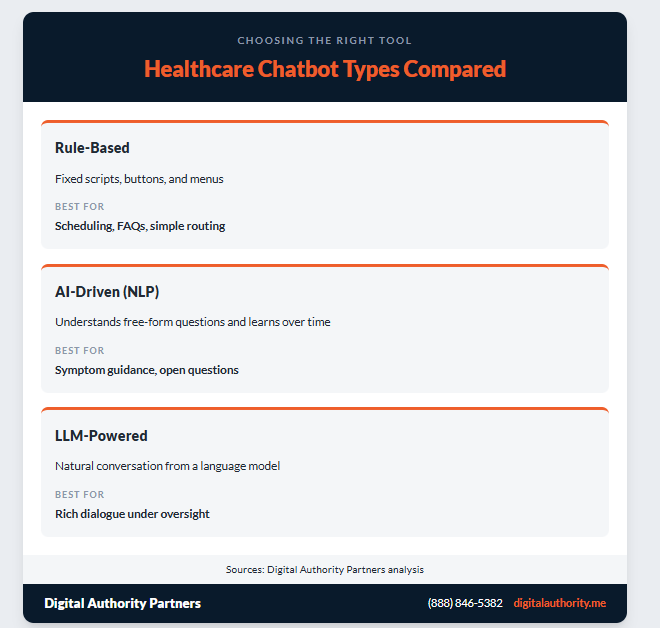
A rule-based chatbot follows a fixed script. It offers buttons and menus, and it handles predictable tasks such as booking a visit or sharing office hours. An AI-driven assistant works differently. It uses natural language processing (NLP) to understand free-form questions, and machine learning helps it sharpen its answers over time. Many practices run a blend of both.
This table shows how the main chatbot types compare, so you can match a tool to the job:
| Chatbot type | How it works | Best for |
| Rule-based | Fixed scripts, buttons, and menus | Scheduling, FAQs, simple routing |
| AI-driven (NLP) | Understands free-form questions, learns over time | Symptom guidance, open questions |
| LLM-powered | Natural conversation from a language model | Rich dialogue, under oversight |
Where Large Language Models Fit
Large language models power the newest medical chatbots. They let a chatbot hold a natural, back-and-forth conversation. That fluency is a strength and a responsibility. Even a confident-sounding model can miss, so patient-facing answers work best with guardrails, source citations, and a clear path to a human.
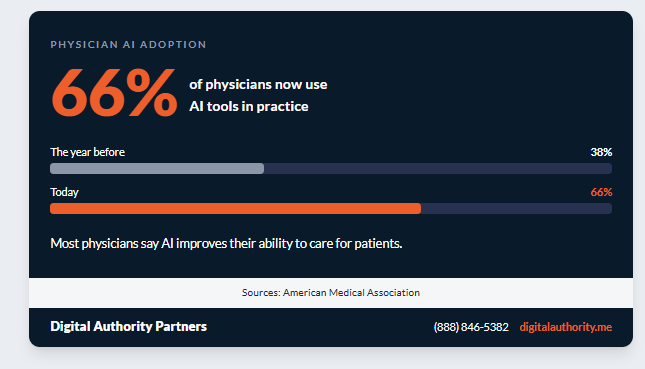
Physician adoption is climbing, too. Roughly 66% of physicians now use AI tools in practice, up from 38% the year before, a shift captured in physician health AI adoption data, and most say it improves their ability to care for patients.
Human Oversight keeps AI Safe
Clinical governance turns a capable chatbot into a trustworthy one. Set clear escalation rules so urgent symptoms route to the right person right away. Log conversations for quality review and keep a clinician in the loop on medical guidance. Update the knowledge base as guidelines change, and follow AI safety in clinical settings. Oversight protects patients and protects your practice.
Personalization That Keeps Patients Engaged
Chatbots turn passive website visits into active health management, and personalization is what makes that happen. Done with care, it’s a proven way to patient engagement with digital tools and build stronger connections with patients.
- Interactive health assessments: Guide patients through symptom checks or health quizzes that inform and engage.
- Personalized health tips: Draw on a patient’s history to offer advice that stays relevant and brings them back.
- Timely reminders: Send follow-up messages and health prompts that show the care journey continues between visits.
- Guided navigation: Lead patients to the services and information that match their needs.
The payoff shows up as measurable gains in engagement. Patients spend more time on your site and follow through on care more often. Many become advocates who recommend your practice, and well-timed prompts for relevant services lift appointment bookings and newsletter sign-ups.
Personalization works best in small, honest doses. Use what a patient shares to make the next step easier, and keep every touch feeling helpful and respectful. Handled this way, personalization deepens the patient relationship.
Privacy, HIPAA, and Patient Trust
A healthcare chatbot handles sensitive information, so privacy has to be built in from the start. Getting this right earns the confidence that makes patients comfortable sharing. Design for compliance with the Health Insurance Portability and Accountability Act (HIPAA) and, where relevant, the General Data Protection Regulation (GDPR):
- Encrypt every channel Secure the data moving between the patient and the chatbot to prevent unauthorized access.
- Collect only what you need Gather the minimum information required and avoid storing unnecessary personal data.
- Offer an anonymous option Let patients ask questions without providing identifiable details when they prefer.
- Ask before you collect Request permission and explain in plain terms how data is used and protected.
- Anonymize your analytics Aggregate interaction data when you analyze it for marketing insight.
For a deeper walkthrough of the requirements, see our guide to HIPAA compliance for medical websites. It covers the HIPAA privacy and security rules and the data protection rules in Europe that apply to any patient-facing tool you build.
Vendor choice matters as much as design. Confirm that any chatbot vendor signs a business associate agreement before it touches patient data, and ask where the data lives, how long it is retained, and who can access it. A vendor that answers those questions clearly is one you can trust with your patients. You can see how we handle this in a healthcare marketing case study.
Patient Insights You Can Act On
Every conversation is a source of insight. Chatbots make it easy to gather patient feedback through short post-chat surveys, and they surface patterns in the questions patients ask most. When many patients ask about managing anxiety, for example, that signal can prompt new articles or services on the topic.
Chatbots also collect contact information accurately at scale. That supports your marketing and helps you serve your community more precisely, so the data your chatbot gathers can shape the content, services, and outreach you invest in next.
Feed these insights back into your website and content plan. If patients keep asking about a service you offer but do not feature, give it more room. The chatbot serves as both a listening tool and a service tool.
How To Add a Healthcare Chatbot To Your Website
A chatbot succeeds or falls short based on how it is designed and integrated. Build with the patient in mind, lean on a custom software development team, and connect the chatbot to the systems that hold the answers. These steps keep the project on track:
- Make it intuitive: Keep navigation simple, then run usability testing and gather feedback to refine the experience.
- Translate medical jargon: Explain one idea at a time, use analogies, and replace technical terms with clear descriptions.
- Add interactive elements: Use buttons, menus, and clickable options to guide patients through the conversation.
- Support text with media: Include images, short videos, and infographics that make concepts easier to grasp.
- Let it learn: Apply machine learning so the chatbot improves its answers as it analyzes real interactions.
- Integrate your systems: Connect the chatbot to electronic health records and scheduling platforms for real-time, accurate responses.
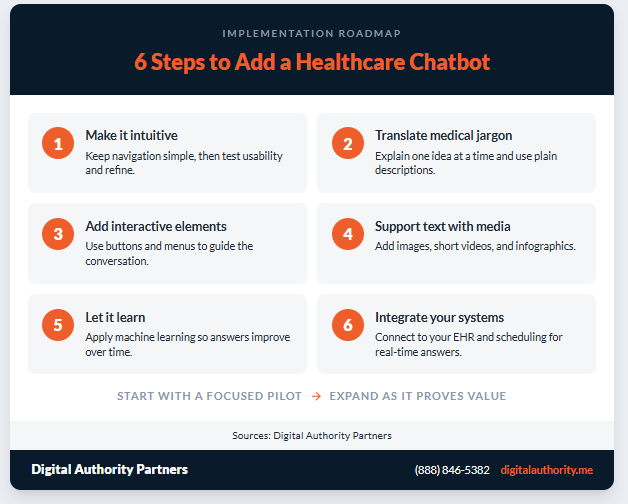
Start with a focused pilot, such as scheduling or FAQs, then expand once the chatbot proves its value. A staged rollout gives your team time to tune the answers and gives patients a reliable experience from day one.
Healthcare Chatbot Examples In Practice
It helps to picture where a chatbot fits in a real practice. These scenarios show the range, from simple front-desk automation to guided care between visits.
The Digital Front Desk
A busy clinic points its website chatbot at the questions the front desk hears most. It shares hours, directions, insurance accepted, and new-patient steps. Callers who once waited on hold get an instant answer, and staff reclaim hours for the patients standing in front of them.
The After-Hours Triage Guide
An urgent care center adds a symptom guide that runs when the office is closed. It asks a few questions, flags anything serious for the emergency line, and routes routine issues to the morning schedule. Patients feel guided instead of guessing, and clinicians start the day with a sorted queue.
The Chronic Care Companion
A specialty practice uses a chatbot to check in with patients managing a long-term condition. It sends medication reminders, gathers a quick symptom update, and escalates concerning answers to a nurse. Care continues between visits, and the care team spots problems earlier.
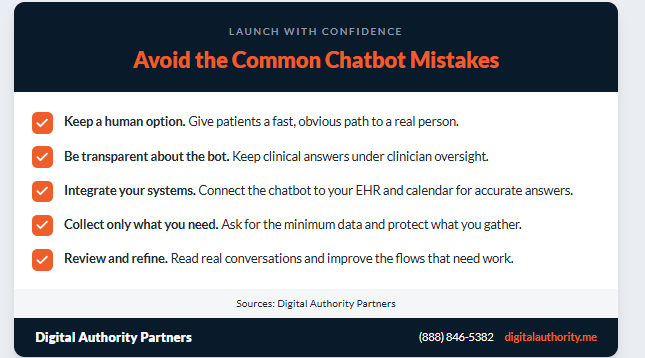
Common Mistakes to Avoid When Adding a Chatbot
A few missteps trip up otherwise strong projects. Watch for these before you launch:
- Hiding the human option: Always give patients a fast, obvious path to a real person.
- Overpromising the AI: Be transparent that it’s a bot, and keep clinical answers under oversight.
- Skipping the integration: A chatbot cut off from your EHR and calendar gives stale answers.
- Collecting too much data: Ask only for what the task needs, and protect what you gather.
- Launching and leaving it: Review real conversations and refine the flows that fall short.
Steering clear of these keeps the experience trustworthy. It also protects the patient relationship you have worked to build.
Measuring Whether Your Healthcare Chatbot Works
A healthcare chatbot earns its place when you can point to results. Set a baseline before launch, then track a short list of metrics that tie back to patient care and practice goals. What does that mean for you? Clear numbers make the case to keep investing.
- Containment rate: The share of conversations the chatbot resolves without a handoff to staff.
- Appointments booked: Visits scheduled through the chatbot, plus any drop-in no-shows from reminders.
- Response and resolution time: How quickly patients get an answer compared with phone or email.
- Escalation accuracy: How often urgent cases are routed to a person correctly and quickly.
- Patient satisfaction: Post-chat survey scores and repeat usage over time.
Review these numbers monthly and refine the conversation flows that underperform. Compare your results against healthcare chatbot performance benchmarks. Small, steady improvements compound, and the chatbot gets better at serving patients the longer it runs.
Frequently Asked Questions
What Are Healthcare Chatbots?
Healthcare chatbots are software assistants that talk with patients through a website or app. They answer common questions, book appointments, guide symptom checks, and hand off to staff when a person is needed. Modern healthcare chatbots use natural language processing to understand free-form questions and connect to your scheduling and records systems for accurate replies.
How Are Chatbots Used in Healthcare?
Practices use them for appointment scheduling and reminders, symptom triage, medication refills, insurance and billing questions, and post-visit follow-ups. They also gather patient feedback and surface trends in the questions people ask most. The goal is to handle routine work automatically so staff can focus on patients who need a person.
Are Healthcare Chatbots HIPAA Compliant?
They can be, when privacy is built in from the start. A compliant healthcare chatbot encrypts every channel, collects only the data it needs, asks permission before gathering information, and anonymizes analytics. Confirm that your vendor signs a business associate agreement and follows the HIPAA privacy and security rules.
How Accurate Are Chatbot Symptom Checkers?
Accuracy varies widely by tool. As the symptom checking and triage section above explains, the JMIR study mentioned earlier tested six checkers against 400 physician-reviewed vignettes and found meaningful differences between them. Treat symptom checking as guidance that routes patients to the right level of care, keep a clinician in the loop, and make sure urgent symptoms escalate to a person right away.
Which AI Chatbot Is Best For Healthcare?
The best fit depends on your needs, your systems, and your compliance requirements rather than a single brand. Look for HIPAA support, integration with your EHR and scheduling tools, clinical oversight features, and a clear escalation path to staff. A custom build often serves a practice better than a generic tool.
Do Patients Trust Healthcare Chatbots?
Trust is growing, especially for lower-risk questions and administrative tasks. Patients value the privacy of asking sensitive questions anonymously and the speed of an instant answer. You build trust by being transparent that they’re talking to a bot, protecting their data, and making it easy to reach a human.
How Much Does a Healthcare Chatbot Cost?
Cost depends on scope. A simple FAQ and scheduling bot on an existing platform costs far less than a custom, AI-driven assistant integrated with your EHR. Weigh the price against the staff hours saved, the no-shows prevented, and the appointments booked after hours. Many practices start with a focused pilot to prove value.
Can a Chatbot Integrate With My Ehr And Scheduling System?
Yes. Integration is what makes a chatbot genuinely useful, because it can pull real-time availability, book directly into your calendar, and reference accurate patient information. Plan the integration early and confirm your vendor supports the systems your practice already runs.
Is a Medical Chatbot The Same as Chatgpt?
Not quite. General assistants like ChatGPT are not built for clinical use or HIPAA compliance out of the box. A medical chatbot is purpose-built for healthcare, with guardrails, source citations, escalation rules, and integrations that a general tool does not provide. Some medical chatbots use similar underlying language models inside a compliant, supervised setup.
How Long Does It Take To Launch a Healthcare Chatbot?
A basic scheduling or FAQ bot can go live in a few weeks. A custom, AI-driven assistant with EHR integration and clinical review takes longer, often a few months. A staged rollout, starting with one use case and expanding, gets value in front of patients sooner while your team tunes the experience.
Will a Healthcare Chatbot Replace My Staff?
No. A chatbot handles routine, repetitive work so your team can focus on the patients who need a person. Think of it as a first-line assistant that answers common questions and books visits. Your staff still brings the judgment, empathy, and clinical care that a chatbot cannot provide.
How do I Get Patients To Use the Chatbot?
Place it where patients already look, such as your homepage, contact page, and appointment pages. Give it a clear, friendly prompt that names what it can do. Make the human handoff obvious so no one feels stuck. As patients see quick, useful answers, usage grows on its own.
Key Takeaways
Healthcare chatbots reward the practices that deploy them thoughtfully. They improve the patient experience, ease staff workload, and open a steady channel for engagement and growth. The technology is ready, and the practices that treat a chatbot as part of a broader digital strategy see the strongest returns. Keep these fundamentals in mind:
- Patients come first, so answer real questions quickly and point people to the right care.
- AI needs oversight, so keep a clinician in the loop and escalate urgent symptoms fast.
- Privacy earns trust, which means encryption, minimal data collection, and an anonymous option.
- Integration drives value, since an EHR-connected chatbot gives accurate, real-time answers.
- Measurement guides investment, because a few metrics show what’s working and what to refine.
Ready to add a healthcare chatbot that your patients will use? Work with a healthcare marketing and development team experienced in patient-facing tools. Contact Digital Authority Partners to plan, build, and launch a chatbot built for your patients and your practice.
Want To Meet Our Expert Team?
Book a meeting directly here

Related Articles
IN SHORT Digital Authority Partners audited 150 US ABA and autism therapy clinic websites in July 2026, scoring each ...


Your phone can walk you through a panic attack faster than most clinics can return a call. More than one billion peop...

United States shoppers spent $326.7 billion online in the first quarter of 2026, according to the U.S. Census Bureau....